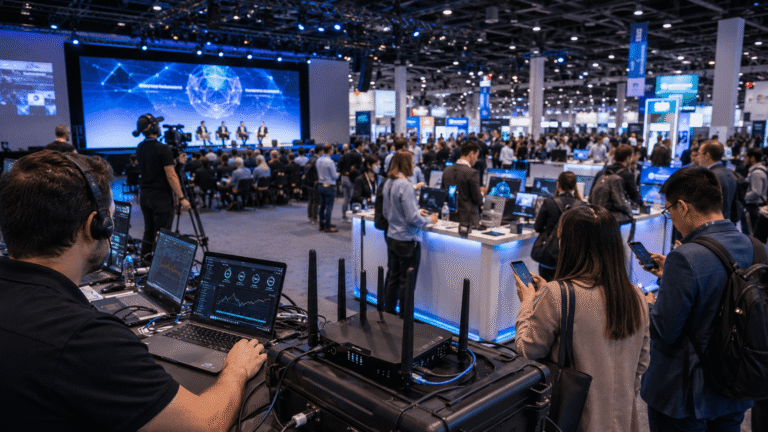

If you’ve worked an event larger than fifty people, you’ve watched the WiFi fail at the worst possible moment. The keynote starts, three hundred phones simultaneously open the event app, the speaker’s slide deck stalls loading, and the production team in the back of the room is frantically trying to figure out why the livestream just dropped. WiFi at events isn’t a small problem. It’s the line item that quietly determines whether your event runs clean or runs ragged.
Here’s a practical guide to thinking about WiFi at events — what fails, why it fails, why crowded spaces like arenas and exhibition halls are harder still, and what the production teams running successful events do differently.
Walk into any hotel ballroom, convention center, museum, or corporate office that hosts events, and you’ll find a WiFi network. Walk into the same venue during a packed event with five hundred people working their phones, exhibitors running demos, and a livestream feeding remote attendees, and you’ll find that WiFi network struggling. There’s a structural reason for this gap, and it’s not because venue IT teams are doing anything wrong.
Venue WiFi is specified for steady-state, average-case usage — small numbers of users moving through the venue throughout a day, each pulling moderate traffic. It’s not specified for the simultaneous peak load of an event, where every attendee shows up at the same hour, every device joins the network within the same fifteen minutes, and every concurrent demand for bandwidth hits the same uplink simultaneously. The hardware can’t keep up because it was never sized for that demand profile. Adding more access points doesn’t solve it — the bottleneck is upstream, in the venue’s uplink to the broader internet.
Arenas are about as hard as event WiFi gets. You’re packing thousands of people into one bowl, and most of them reach for their phones at the same moments: walk-ons, goals, the encore. A few things make it difficult:
That’s why arena events need a network planned for those conditions: lots of high-capacity access points placed around seating, concourses and the event floor, separate networks for operations and guests, and a strong, redundant uplink. More on how that works for stadiums and arenas on our sporting event WiFi page.
The ways venue WiFi fails at events have a pattern, and recognizing the pattern lets you plan around it. The most common scenarios:
Attendee browsing saturates the channel. Three hundred attendees open Instagram during a keynote break and the venue’s wireless channel goes to its knees. Production uplink, which was sharing the same channel, drops below the threshold needed to sustain the livestream. The stream stalls. The remote audience sees a buffering icon for ninety seconds.
Exhibitor booths starve each other. Forty exhibitors run simultaneous video demos, each pulling 5–10 Mbps continuously from the venue’s shared network. The total exhibitor traffic exceeds the venue’s allocated bandwidth for the exhibit hall. Demos start stuttering or dropping. Lead capture systems time out. POS terminals fail to authorize transactions.
Livestream upload hits the upstream bottleneck. The venue’s downstream bandwidth might be generous, but the upstream connection (the side that matters for livestream) is typically much smaller. A single 25 Mbps broadcast feed can saturate the venue’s uplink even before attendees join the network.
Concurrent breakout rooms compete for the same backbone. A conference runs four breakouts simultaneously, each with its own video call to remote presenters. Each breakout’s uplink competes for the same backbone connection. Calls drop, slides stop sharing, audio echoes.
These aren’t theoretical — they’re the standard failure modes that show up at almost every event running on venue-supplied WiFi at meaningful scale.
Exhibition halls are dense in a different way from arenas. Thousands of attendees walk the floor, but there are also hundreds of exhibitors, each booth with its own demos, lead capture and card readers. The options that work:
For exhibitors who just need their own booth to work, a portable bonded kit is often the simplest answer. See our trade show internet options.
The event producers who don’t have these failures are following a pretty consistent playbook. It’s worth understanding because it’s the model that increasingly defines what “competent event WiFi” looks like.
First, they don’t rely on the venue network for anything mission-critical. Production uplinks, broadcast feeds, point-of-sale systems, and live presenter platforms run on dedicated event-specific network infrastructure that they bring in themselves. The venue WiFi becomes the attendee-only network, which keeps things simple and prevents one user category from sinking another.
Second, they segment the network by use case. Production, sponsors, exhibitors, press, and attendees each get their own SSID with deliberately allocated bandwidth and routing priority. When attendees saturate their network, it doesn’t touch the production stream. When exhibitors run heavy demos, it doesn’t slow down the press uploading photos.
Third, they deploy bonded cellular as the primary uplink instead of relying on a single venue line. Bonded cellular combines bandwidth from multiple carriers (Verizon, AT&T, T-Mobile) into a single managed connection that survives any one carrier saturating at peak attendance. When 30,000 fans at a sports event all hit the same cellular tower, the bonded rig shifts load to the other carriers automatically.
Fourth, they add satellite redundancy when the venue is outdoor or remote. Starlink-based satellite hotspots provide a parallel uplink path that’s completely independent of ground cellular. If the cellular networks all go down — peak crowd saturation, weather disruption, infrastructure outage — satellite keeps the network alive.
Fifth, they have on-site network engineering throughout the event. Connectivity issues at events don’t follow a predictable schedule — they show up when crowd load shifts or when an unexpected demand pattern emerges. Having an engineer on-site who can rebalance the network in real time is the difference between a clean run and a midday crisis.
Put the playbook above together and you get the building blocks that work when the crowd is big:
| Building block | What it does | When you need it |
|---|---|---|
| Dedicated event network | Keeps production, POS and presenters off the shared venue WiFi | Any event where something can’t be allowed to drop |
| Bonded cellular uplink | Combines several carriers into one connection that fails over automatically | Most indoor and urban events |
| Satellite redundancy | Adds an uplink that doesn’t depend on local cell towers, such as Starlink | Outdoor, remote or high-stakes events |
| High-capacity access points | Handle more simultaneous connections and interference than standard venue gear | Dense rooms, halls, arenas |
| Segmentation and QoS | Separate networks per group, with priority for critical traffic | Whenever guests and operations share a site |
| Engineers on-site or on call | Monitor live and rebalance as the crowd moves | Larger events and anything broadcast |
Yes, and for anything beyond a single booth you should. A custom design starts from your floor plan, headcount and the systems that must stay online. The site is reviewed in advance, access points are placed around stages, booths and registration rather than wherever cabling is convenient, and bandwidth is allocated per zone and user group. We walk through the full process in Event WiFi Best Practices.
The practical planning checklist is straightforward once you accept that venue WiFi probably isn’t enough. Work through these questions early in your event planning cycle:
How many concurrent connected devices will you have at peak? Take attendee count and multiply by 1.5 (most attendees connect a phone plus a laptop or tablet). Add exhibitor and sponsor device counts. Add production gear. The number is almost certainly higher than you initially estimated.
What’s your mission-critical traffic, and what’s the worst-case scenario if it drops? If your livestream goes dark for two minutes during a keynote, what’s the impact? If your point-of-sale stops authorizing, how much revenue do you lose? Mission-critical traffic gets dedicated bandwidth allocation, not best-effort shared network.
Is the venue outdoor, indoor, or hybrid? Urban or remote? Outdoor venues at remote locations need satellite redundancy. Urban venues with strong cellular don’t need satellite but benefit from bonded cellular. Indoor venues with thick walls or steel construction need access point placement planning, not just a bigger uplink.
Does the layout need a site survey? Arenas, exhibition halls, multi-building venues and anything with heavy walls or steel benefit from someone reviewing the space before the event to plan access point placement and spot interference.
What’s your network engineering capability on-site? If you don’t have someone who can configure a multi-SSID setup, monitor real-time bandwidth, and reallocate when needed, you need a connectivity provider who brings that engineering with the gear. WiFi without active management at events is roughly equivalent to a fire alarm with no one to monitor it.
Event WiFi rental isn’t cheap. A bonded cellular deployment for a mid-size corporate conference might run $1,500–$3,000 per day. A larger trade show or festival deployment can scale into five figures. Sticker shock is real, and the temptation to just use the venue’s free WiFi is understandable.
The math that tilts producers toward paid event WiFi is risk-weighted. A $2,500 daily rental looks expensive until you compare it to the cost of a failed keynote livestream watched by 5,000 remote attendees, or a POS system that goes offline for forty-five minutes during peak transaction time, or a sponsor activation that loses its lead capture for the entire event. The downside scenarios on venue-only WiFi have meaningful financial consequences. The upside scenario on dedicated event WiFi is a clean run that nobody notices because everything works.
For most professional events at any meaningful scale, the math favors paying for dedicated event connectivity. The exceptions are very small gatherings or events where the venue’s WiFi has been independently verified to handle the specific load profile (rare, but it happens). Think of dedicated event WiFi less as a bill and more as insurance against those much bigger losses.
WiFi at events is no longer something you can outsource to the venue and hope works. The bandwidth demands of modern events — hybrid attendance, livestream production, sponsor activations, exhibitor demos, AI-enabled event apps — exceed what venue networks were designed to handle, and the gap is widening. The events that run clean treat connectivity as a deployment item with its own gear, engineering, and SLA. The events that don’t, run on hope.
If you’re planning an upcoming event and want to think through the connectivity stack from the ground up, the WiFiT homepage walks through the bonded cellular, satellite-hybrid, and large-scale deployment options across event formats from corporate meetings to multi-day festivals.
Venue WiFi is built for steady, everyday use, not hundreds or thousands of people connecting at once. The usual causes are a limited uplink (especially upload), access points not sized for that many devices, and too many devices competing for the same channels.
When too many devices connect at once they compete for limited wireless airtime, which raises interference and slows everyone down. Connections drop and critical systems suffer unless the network is designed and managed for that load.
Thousands of users in one space, concrete and steel that block signal, heavy radio interference, and the need for a backhaul big enough for everyone at peak. Arenas need many well-placed high-capacity access points and a strong, redundant uplink.
Separate SSIDs for attendees, exhibitors and production, more access points planned around the booth layout (with directional antennas where booths are tight), dedicated kits or reserved bandwidth for heavy booths, and a redundant uplink.
A dedicated event network, bonded cellular uplinks with automatic failover, satellite backup where needed, high-capacity access points, network segmentation with QoS, and engineers monitoring the network on-site or on call.
Yes. The design starts from your floor plan, headcount and critical systems. The site is reviewed in advance, access points are placed for coverage and capacity, and bandwidth is allocated per zone and user group.
Peak device count, which traffic is mission-critical and what happens if it drops, whether the venue is indoor or outdoor and urban or remote, whether the layout needs a site survey, who manages the network during the event, and budget versus risk.
Bring in a dedicated event network, segment it by use, use redundant uplinks such as bonded cellular plus satellite, and have engineers managing it during the event.
A site survey reviews the venue before the event to spot interference, plan where access points go for coverage and capacity, and plan cabling, so the network fits that specific space with fewer dead zones.
It keeps user groups and traffic types apart, so attendee browsing can’t slow down livestreams or POS, each group gets its own bandwidth, and devices on one segment can’t reach another.
Bonded 5G kits with unlimited data. Pick the one that fits your event.

Up to 20 users
For booths, meetings and smaller events.

Up to 300 users
For conferences, festivals and live streams.